
Follows A 127 GB Model on a 96 GB Card.
TL;DR
On September 7 I had Qwen3.8-Flash-Next NVFP4 running on one RTX PRO 6000 at 94 tok/s
single-request with a 300K-token KV pool. Seven weeks later the same card, checkpoint and 256K
context serve it at about 205 tok/s single-request, about 440 tok/s across four requests,
with a 945K-token pool. Nearly all of that came from switching to Penny Royal, John
Pezzulli’s open-source, SGLang-derived runtime built for this card. It
trims about 10 GB from the loaded weights, keeps conversation state in system RAM, and makes
speculative decoding much faster. FP8 KV, auto-sized memory and one width-policy file did the rest.
DFlash2 lost to native MTP at every concurrency. Note the card: this is the 300 W Max-Q, so a 600 W
RTX PRO 6000 should be faster on prefill, and probably somewhat faster on decode too: with
speculative decoding, this card hits its 300 W cap about half the time it’s decoding.
The box, and the asterisk on every number
Everything below runs on an RTX PRO 6000 Blackwell Max-Q: SM120, 96 GB, and a 300 W power cap. The full-size RTX PRO 6000 Workstation Edition has the same chip and memory, with twice the power budget at 600 W. Under load this card sits right at its cap: 300–307 W, 85–88 °C, SM clocks ranging between about 1,500 and 2,360 MHz.
Prefill is compute-bound, so the cap costs the most there. Plain decode is mostly limited by memory bandwidth and usually sits under a power cap. I’ve measured that before: on a pair of 5090s, raising the cap 15% moved prefill and left decode flat, at about 254 W. Speculative decoding changes the picture, because every step verifies 4–8 draft tokens at once, and that’s real compute. During a decode sweep here the card averaged 278 W, and the power cap was actively throttling in 54% of busy samples, with SM clocks at 2,010–2,295 MHz against a 3,090 MHz maximum. So the cap costs decode less than prefill, but it does cost it. If you have the 600 W card, treat my numbers as a floor on both.
The host is an Intel Core Ultra 7 270K Plus (24 cores) with 192 GB of RAM since a mid-October upgrade, which turns out to matter a lot.
Where we started: stock SGLang, and why not vLLM
The September post covered bring-up in detail. Short version: the checkpoint is 127 GB, the card is 96 GB, and a 48 GB PLE n-gram embedding table lives in host RAM. SGLang did that out of the box. vLLM did not: its PLE CPU offload deadlocked at TP=1 in two places.
I’d love to show you a vLLM column here. I don’t have one. I never got a vLLM server to answer a request on this card, so everything below is SGLang or SGLang-derived.
That may have changed. The offload branch that deadlocked here was closed unmerged. A different design, UVA PLE offload (vllm#54371), merged on September 9, and it reads the table straight from pinned host memory instead of going through the worker queue that hung. Together with model support (#53896) and the FP8-PLE loading fix (#54882), it shipped in vLLM v0.30.0 (September 22) and is in every release since, up to v0.32.0 (October 18). On paper, stable vLLM can now serve this checkpoint on one card. I haven’t tried it, and I haven’t seen anyone report it on an RTX PRO 6000, so treat that as a lead, not a result.
The starting line, on a pinned stock SGLang build with BF16 KV:
| Aug 27, stock SGLang | |
|---|---|
| decode, 1 request | 94.5 tok/s |
| decode, 4 requests | 307 tok/s aggregate |
| prefill, ~25K cold prompts | ~11.1–11.7K tok/s |
| KV pool | 300K tokens (one 256K session) |
Step one: FP8 KV, and a pool twice the size
SGLang v0.5.20 (September 18) was the first release carrying this model, and it fixed the FP8 KV crash that had kept me on BF16. FP8 halves the bytes per token, so the same 6.86 GB of KV went from 300K to 600K tokens: two full 256K sessions at once instead of one.
Decode didn’t move (90 tok/s, within noise), and prefill held at ~12.1–12.3K tok/s. The quality evidence for unit-scale FP8 KV on this model is good: a user running the same card and checkpoint measured 99.15% top-1 agreement against BF16 at 29.5K context. Free capacity, no catch I could find.
Step two: speculative decoding, the obvious win I kept not taking
The checkpoint ships an MTP head, and upstream measured ~148 tok/s single-stream with it on this card. I held off for weeks because of an open SGLang issue where draft acceptance decays to near zero over 16–24 hours of uptime. That’s a silent 2.9× slowdown on an endpoint people use.
When I finally tried stock nightly SGLang with MTP, FR-Spec and HiCache in October, it was accurate but not especially fast. Tuned, it reached 132 tok/s single-request and 388 aggregate, but MTP’s draft weights and verify buffers shrank the KV pool to 507K. Better than plain stock, but not the jump I wanted.
Step three: Penny Royal
If you haven’t heard of it, I hadn’t either until a few weeks ago. Penny Royal is an open-source fork of SGLang by John Pezzulli, built for one job: running Qwen3.8 on the RTX PRO 6000 (one card or two). It ships as a prebuilt container plus a startup script you keep on the host. It’s not a general-purpose server. It supports two models and one GPU family, and that narrowness is the point: every kernel choice, memory budget and default is tuned for exactly this hardware.
I didn’t recognize the name and had to ask Grok. It comes from Neal Asher’s Polity novels, where Penny Royal is a rogue AI usually seen as a mass of black crystals. That’s also the source of the project’s black-crystal logo, and it suits software written largely by an AI.
Its README puts persistent conversation caching at the centre. Conversation state that no longer fits on the GPU moves to system RAM and optionally NVMe, so a long agent session can resume without re-reading its whole history. Their showcase example restores a 490K-token conversation and processes five new tokens.
It’s also a striking example of how software is being built now. The release notes say the coding was done almost entirely by an AI agent named Penny, with John, Penny and Codex working through the architecture, tuning and debugging together. The same goes for this side: most of my testing (the benchmarks, the A/B runs, the soak tests and the bisecting) was run by an AI too, Claude Opus 5.5, with me deciding what to test and what to believe.
Penny Royal is the most carefully qualified piece of local-inference software I’ve used this year. Each release ships its exact image digest, the source revision, a results file with per-workload numbers, and a validation section. When something is untested, the notes say so. Few projects work this way.
On October 17 I moved production to Penny Royal 3.0.2 with my local changes: 256K native rope instead of Penny’s 524K YaRN profile, 64 Mamba slots, thinking off by default, and a 48 GB host-RAM cache. Against stock v0.5.20 on the same card that morning:
| SGLang v0.5.20 | Penny Royal 3.0.2 | |
|---|---|---|
| decode per request, N=1 / 2 / 3 / 4 | 90 / 87 / 82 / 77 | 194 / 173 / 134 / 119 |
| decode aggregate, N=4 | 303 | 447 |
| prefill, ~25K, N=1–4 | 12.1–12.3K | 11.9–12.6K |
| KV pool | 600K | 824K |
| NIAH at 229.5K, 5 depths | 5/5 | 5/5 |
About 2.1× single-request decode, 1.5× aggregate, prefill unchanged, and a pool 37% larger. The speed comes from Penny’s adaptive MTP with an FR-Spec draft vocabulary, plus SM120-specific kernels for the small batches decode actually runs.
The extra memory is the part I find most impressive, because it’s on a card with no slack at all:
- About 10 GB off the weights. NVFP4 covers the routed experts, but many of the checkpoint’s other projections and its output head are still BF16. Penny converts those to row-wise FP8 as it loads them, with kernels that read the FP8 weights directly. The same checkpoint loads in 71 GB instead of stock SGLang’s 81 GB, and the MTP draft shares the converted output head instead of keeping its own copy.
- Less waste at startup. Model setup used to build a standard attention backend only to replace it immediately with the QSA sparse-attention one. Penny skips the throwaway, and its compatible QSA decode paths share one scratch buffer. Penny’s notes say this alone paid for adaptive MTP’s extra memory.
- 3.1 goes further: it frees weight-loading temporaries before measuring free memory, then sizes the KV pool from what’s actually left instead of using a preset cap (more on that below).
The result: Penny runs speculative decoding and has a KV pool larger than stock SGLang without it.
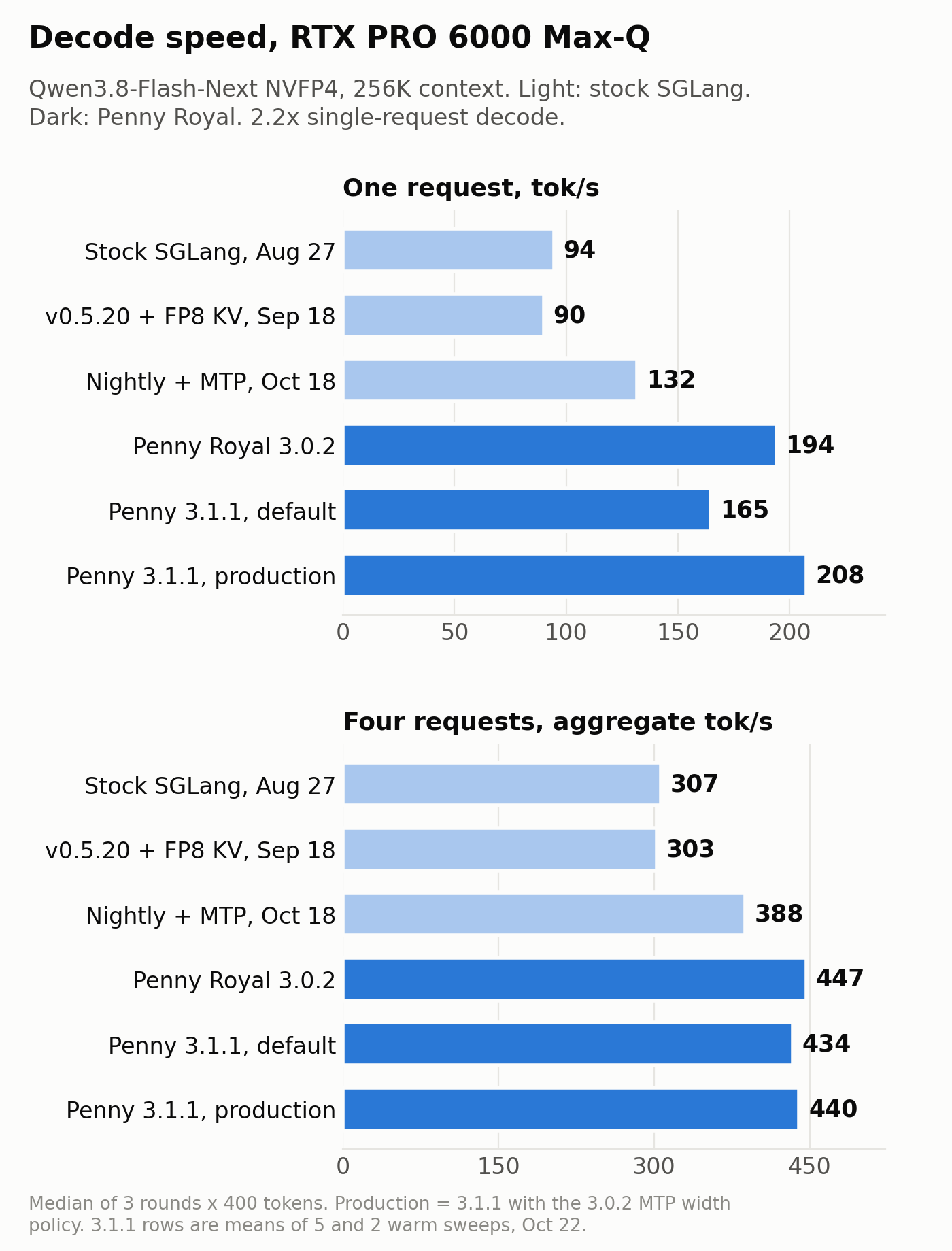 Light bars are stock SGLang stages; dark bars are Penny Royal. Same card, checkpoint and context throughout.
The bug that returned confident wrong answers
The 48 GB host-RAM cache (HiCache) is the reason the RAM upgrade mattered. Radix-cache entries evicted from the GPU keep a copy in system RAM, and a returning conversation restores in about 0.2 s instead of re-reading 200K tokens in 20 s.
On stock v0.5.20, every host hit I tested gave the wrong answer. Penny 3.0.2 did better but still failed: with the host tier on, 12 of 18 needle tests passed and only 3 of 18 replies matched the cold run. The model answered fluently and incorrectly. That’s the worst failure mode there is.
The cause was a missing wait. The QSA compressed-key reader didn’t wait for its layer’s host-to-GPU copy to finish before reading. Upstream SGLang had already fixed the same race in its own code (sglang#39893). I reported it as Penny issue #74, sent the fix as PR #75, then folded it into a larger PR (#79) with thirteen other upstream SGLang fixes I’d triaged from about 3,000 commits. With the fix: 9/9 needles, 9/9 identical to cold, and 516/516 needles in a 1-hour, 4-client soak.
John merged #79 for 3.1, minus six items, and the PR description says why for each one. The
stop-string limits were too strict for real multilingual workloads. My anyOf tool-parser change
coerced some valid arguments incorrectly. My fused-finalize default change had no demonstrated
benefit. That last point matched my own A/B, where a first +15% result didn’t reproduce across 14
interleaved sweeps. Each rejection was correct or at least defensible, and I’d rather contribute
to a project that reviews this closely than to one that merges everything.
Vision: what I tried and what stayed
Qwen3.8-Flash-Next has a 445M-parameter vision tower. I tried moving it to the box’s RTX 5070 Ti (encoder disaggregation, so the 6000 would only run the language model). It worked, and I reverted it the same day:
- The 5070 Ti ran the vision encoder about 3.5× slower than the RTX 6000 does.
- Image throughput capped at about 2.7 images per second.
- It freed no memory on the 6000, because the language-only server still builds the tower.
What stayed: the vision encoder on the RTX 6000 with FlashAttention-4 (about 3.5× faster than the SM120 default) and no image-size cap. Today’s test, two rounds of each: four 16.7 MP images at once, 8/8 codes read correctly; four 16.7 MP images in one request, all four codes in order both times. GPU memory peaked at 96,796 of 97,887 MiB. It’s tight, and it works.
I also wrote a small patch to encode concurrent images in bounded groups, so four large images couldn’t spike the encoder’s memory at once. On 3.1.1 I logged it and found it never fires: with 4,096-token prefill chunks, each full-size image is already encoded in its own step. Chunked prefill is what keeps vision memory bounded, so I didn’t send the patch upstream, and tonight I removed it from production.
None of my code, more KV
Penny 3.1 shipped October 21 and 3.1.1 today. It merged #79, so my 18 patched files dropped to four small local ones, and by tonight to none: two were the no-op vision patch above, and two were leftovers from the reverted 5070 Ti encoder experiment. Production now runs the stock 3.1.1 image, with only its startup settings and one policy file changed. 3.1 also replaced the fixed KV cap with automatic sizing, and the pool went from 824K to 945K tokens.
Validation on the stock 3.1.1 image: host-cache restores 3/3 identical to cold, NIAH 5/5 at 220K, four 235K-token requests at once (99% of the pool, no retractions), and a 15-minute 4-client soak with zero server errors. Decode across four requests is unchanged at 430–454 tok/s.
For a single request, 3.1 ships a new MTP width policy. On this card, 3.0.2’s policy is faster: 206–209 tok/s, against 164–174 tok/s with 3.1.1’s default. Production runs the 3.0.2 policy file.
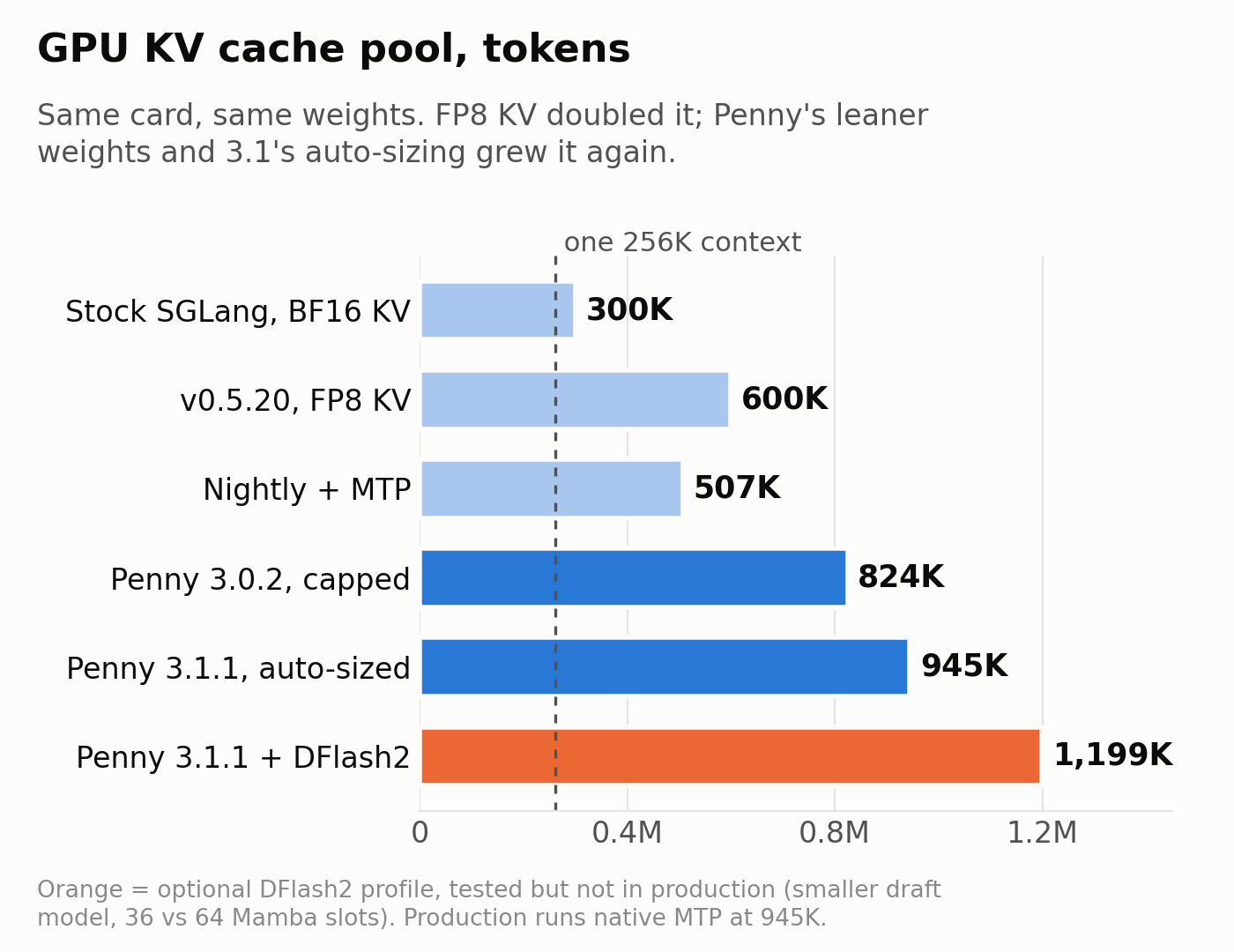 FP8 doubled the pool; Penny’s leaner weights and 3.1’s auto-sizing grew it again. The dashed line is one full 256K context.
DFlash2 vs native MTP
3.1 added an optional DFlash2 profile: same target weights and cache stack, plus a separate 1.2 GB block draft model. I ran it against MTP with 3.1.1’s default width policy, same session, identical tests:
| Native MTP (3.1.1 default policy) | DFlash2 | |
|---|---|---|
| decode, 1 request | 162 | 178 (+10%) |
| decode, 2 requests (per request) | 178 | 148 (−17%) |
| decode, 3 requests (per request) | 137 | 128 (−6%) |
| decode, 4 requests (aggregate) | 446 | 429 (−4%) |
| time to first token, 1 request | 108 ms | 92 ms |
| prefill | 12.0–12.5K | 12.0–12.4K |
| GSM8K (1,319, temp 0) | 96.96% | 96.73% |
| GPU KV pool | 945K | 1.2M |
| host RAM, server process | ~97 GB | 131 GB, swapping |
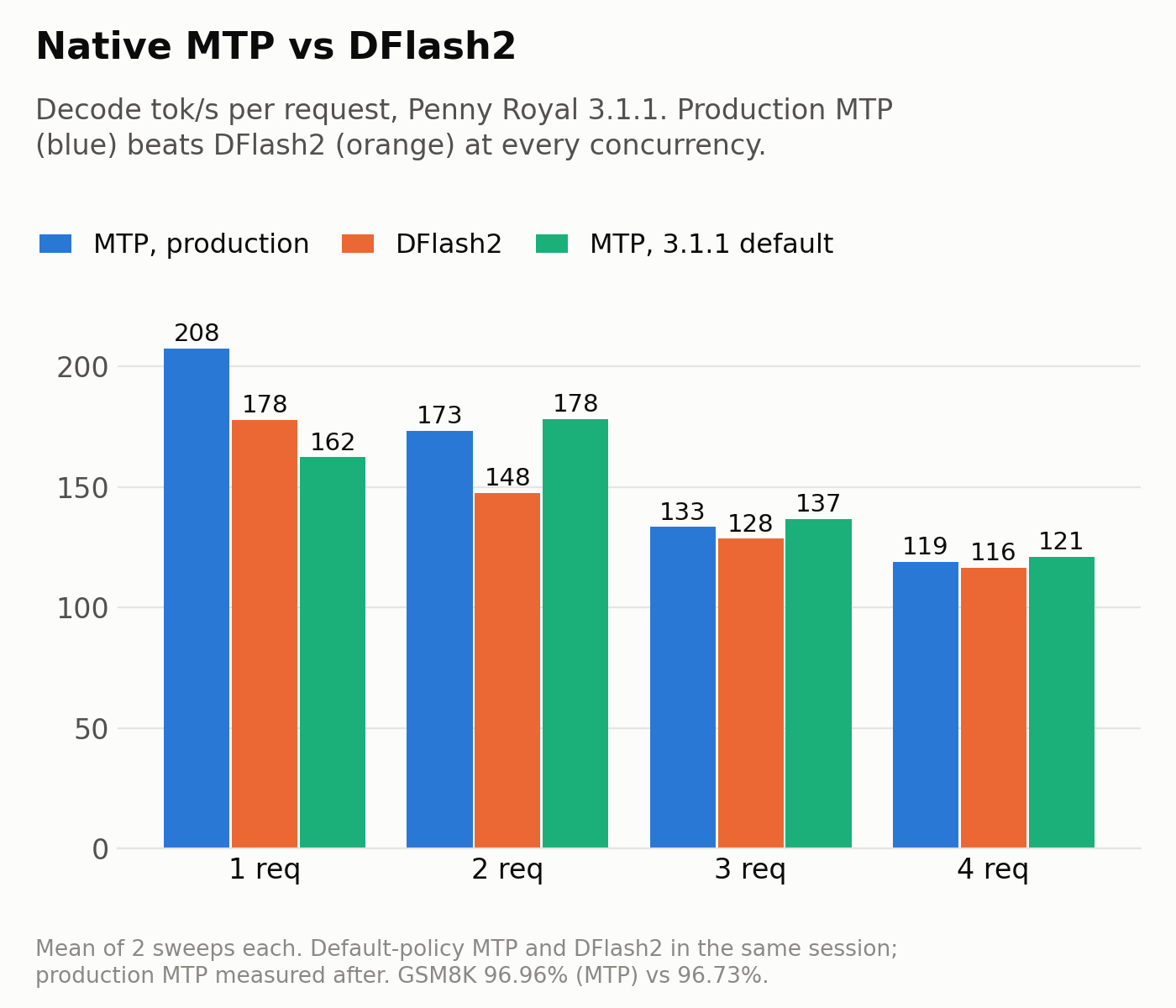 Per-request decode, mean of two sweeps each. DFlash2 beat default-policy MTP only at one request; production MTP with 3.0.2’s width policy beats DFlash2 at every concurrency.
Against MTP with 3.1.1’s default policy, DFlash2 won only with a single request in flight. With the 3.0.2 width policy, MTP measures 208 / 173 / 133 per request (440 aggregate), ahead of DFlash2 at every concurrency. DFlash2’s draft also keeps a 32.9 GB host-RAM pool on top of the 48 GB cache budget. Penny’s notes say they are “still evaluating performance across concurrency levels”, and that’s consistent with what I found. On this card and this traffic, MTP stays. On traffic that accepts more draft tokens, DFlash2’s balance may well be different.
Mamba state vs KV: leave it alone
This is a hybrid model. Every running request needs Mamba (GDN) state slots as well as KV, and cached conversations need a Mamba state to be reusable. I nearly moved from 64 slots to 96 today. Two days of production logs said not to:
- KV peaked at 16% of the pool. Running requests never come close to filling it.
- Of 32,440 prefix-cache matches, 99.2% found their Mamba state on the GPU, and 0.5% restored it from host RAM in well under a second.
- Each Mamba slot costs about 4,900 KV tokens. Going to 96 would shrink the pool to about 787K and give up running four 235K-token requests at once, to save about 161 fast restores over two days.
The host-RAM tier already does the job extra GPU slots would do. 64 stays.
Meanwhile, on the $1,000 box
The RTX PRO 6000 wasn’t the only machine that got faster on this model in those seven weeks. The
$1,000 eBay box from 200 Billion Parameters for $1,000 (two
2016 Xeon E5-2698 v4s, two 16 GB Quadro P5000s, and 192 GB of DDR4 after
the junk-drawer upgrade) also runs Qwen3.8-Next, as
a 4-bit GGUF on llama.cpp with the experts in system RAM. Over the same stretch, its decode went
from 14 to 27 tok/s and its prefill from 150 to 225 tok/s. The prefill gain is the
ubatch-size change from Doubling the Prompt Speed of LLMs on My $1,000 eBay Server.
| $1,000 eBay box, llama.cpp | RTX PRO 6000 Max-Q | |
|---|---|---|
| decode, 1 request | 14 → 27 tok/s | 94 → ~205 tok/s |
| prefill | 150 → 225 tok/s | ~11.1–11.7K → ~12K tok/s |
Both machines roughly doubled single-request decode. The difference is in the other row: tuning the 6000 left prefill where it was, while the eBay box gained 50%. The gap is still large: about 8× on decode and more than 50× on prefill. But 27 tok/s is a comfortable reading speed, and the eBay box gets there for a small fraction of the card’s price. For the rest of that series, see The $1,000 Box, One Month On and the eBay AI hardware guide.
What I’d tell you before you start
- Check your card’s power cap. Max-Q and Workstation Edition are the same chip but different cards. Compare against numbers from the same variant.
- Pin images by digest, and verify them. Penny publishes the digest in each release’s JSON, which makes that easy.
- Test host-cache hits, not just cold runs. A wrong answer from a fast cache hit looks exactly like a right one.
- Benchmark with unique prompts. Reused filler measures cache hits, not prefill.
- Read the release notes, then measure anyway. Penny’s notes are unusually honest, but your power cap, context length and traffic mix aren’t theirs.
From 94 to around 205 tok/s, 300K to 945K tokens of KV, wrong answers to verified ones, and one image at a time to four at full resolution, on a card I already owned. Most of that is John Pezzulli’s and Penny’s work. My part was measuring it carefully, finding one bug, and sending the fix back.
Methodology: decode figures are medians of 3 rounds × 400 tokens from unique prompts (decode-sweep.py); prefill uses cold ~25K-token prompts. All measurements are mine, on this card, between August 27 and October 22, 2026, except the quoted Penny release figures and the upstream FP8 agreement figure. No vLLM numbers appear because vLLM never served this model on this card; v0.30.0 and later may, untested here. Btw, a human inserted the em dash in the title.