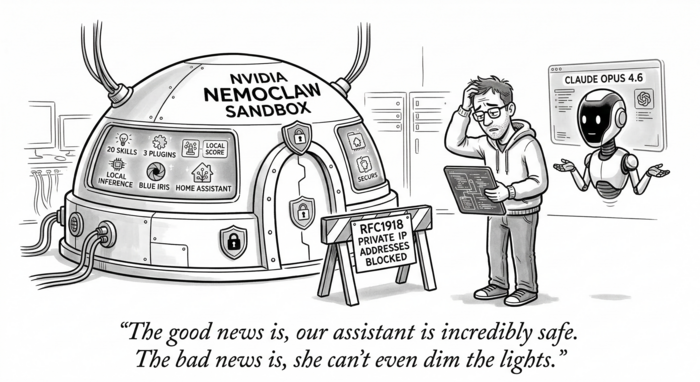
TL;DR
Claude Opus 4.6 and I spent over three hours migrating a heavily customized OpenClaw assistant into NVIDIA’s NemoClaw sandbox runtime. After I tweaked a migration plan that Claude wrote, Claude handled most of the execution autonomously – reading source code, writing config files, running commands, diagnosing failures, and iterating through workarounds – with only a handful of questions and requests for me to run sudo commands. We got the sandbox built, all data migrated, the model config switched, network policies written, and the gateway running. Then we hit a wall: OpenShell 0.0.7 hard-blocks all connections to RFC1918 private IP addresses from within the sandbox, regardless of policy. Since our entire deployment runs on local LAN infrastructure (four inference servers, embedding, reranking, smart home, security cameras), this is a complete blocker. We tried four different workarounds – access: full policies, host.openshell.internal routing, host-side socat forwarders, unsetting proxy variables – and all failed. The sandbox is fully configured and waiting, but until OpenShell ships allowed_ips support, local-only deployments can’t use NemoClaw. Cloud-inference users should be fine today.
OpenClaw is an open-source framework for running always-on AI assistants. NVIDIA’s NemoClaw wraps OpenClaw inside OpenShell, a sandboxed runtime that governs every network request, file access, and inference call through declarative policy. The pitch is compelling: keep your assistant’s full capabilities while adding Landlock filesystem isolation, seccomp syscall filtering, network namespace enforcement, and per-binary egress control.
I run a heavily customized OpenClaw deployment named Charlotte. She manages my smart home through Home Assistant, watches security cameras via Blue Iris, tracks golf handicaps, monitors weather and air quality, handles email through AgentMail, runs browser automation, and talks to me over Telegram. All inference is local, spread across three vLLM instances and an Ollama backup on my LAN. After weeks of stable operation on plain Docker Compose, I decided to migrate into NemoClaw – and I wasn’t going to do it manually.
I paired with Claude Opus 4.6 (via Claude Code) for the entire migration. First, Claude wrote a detailed migration plan after exploring both the existing OpenClaw deployment and the NemoClaw source code. After I reviewed and tweaked the plan, Claude took the wheel. It read source code, wrote all configuration files, executed commands, diagnosed failures, and iterated through workarounds largely on its own, only pausing to ask me a handful of questions and to request I run the commands that needed sudo. Even with an AI partner handling the heavy lifting, the migration took over three hours. Here’s what that looked like.
The Starting Point
The existing deployment ran two Docker containers: openclaw-gateway (the main agent) and openclaw-browser (a headless Chromium sidecar for browser automation). Configuration lived in a docker-compose.yml that mounted host directories into the container:
data/config/mapped to~/.openclaw/inside the container, holdingopenclaw.json, cron jobs, credentials, OAuth tokens, SQLite databases, and a 24 MB LCM conversation database.data/workspace/mapped to~/.openclaw/workspace/, containing 20 custom skills, 2 local plugins (memory-lancedb-pro and lossless-claw), persona files, and agent identity documents.
The docker-compose.yml also injected 30+ environment variables for API keys, smart-home credentials, and inference configuration. A .env file held secrets like Telegram bot tokens, Home Assistant long-lived access tokens, NVR passwords, and golf account credentials.
The primary model was vllm/cyankiwi/Qwen3.5-35B-A3B-AWQ-4bit running on an SGLang instance at 192.168.x.x:xxxx. The migration plan called for switching the primary to vllm3/model (Nemotron 3 Nano 30B) on a different LAN host, with the Qwen model becoming the first fallback.
Installing the Stack
NemoClaw’s installation was straightforward. OpenShell installed cleanly via uv tool install -U openshell (version 0.0.7). The NemoClaw repo cloned from GitHub and npm install && npm link produced a working nemoclaw CLI.
The first hurdle was cgroup v2. The Ubuntu host runs cgroup2fs, and OpenShell’s gateway starts k3s inside a Docker container. Without "default-cgroupns-mode": "host" in /etc/docker/daemon.json, kubelet fails with a cryptic openat2 /sys/fs/cgroup/kubepods/pids.max error. NemoClaw ships a setup-spark script for this, but it requires sudo and also tries to install vLLM locally, which we didn’t need. The manual fix was two commands: write the daemon.json, restart Docker. These were the first of my sudo contributions.
The gateway started cleanly: openshell gateway start --name nemoclaw spun up a k3s cluster inside Docker, deployed the OpenShell Helm chart, and reported healthy within about 30 seconds.
Creating the Sandbox
Rather than running the interactive nemoclaw onboard wizard (which is designed for fresh installs and assumes NVIDIA Cloud inference), Claude executed the sandbox creation steps manually for precise control. This meant reading the onboard source code, understanding the 7-step wizard flow, and replicating the relevant pieces with our custom configuration.
The sandbox builds from a Dockerfile that layers Python, git, and OpenClaw 2026.3.11 onto node:22-slim, creates a sandbox user, and configures the NemoClaw plugin. The build takes a few minutes on first run since it installs 656 npm packages and pulls ~160 MB of Debian packages.
openshell sandbox create \
  --from Dockerfile \
  --name charlotte \
  --policy nemoclaw-openclaw-policy.yaml \
  -- env "CHAT_UI_URL=http://127.0.0.1:18789" nemoclaw-start
The sandbox image gets pushed into the k3s cluster, and a pod is allocated. OpenClaw’s gateway starts inside the sandbox, auto-pairing any browser connections.
Migrating Data: Death by a Thousand Uploads
This was the most tedious part of the migration. OpenShell’s openshell sandbox upload command replaces the Docker volume mounts that the old deployment used. Every file and directory had to be uploaded individually. Claude ran approximately 25 upload commands, diagnosing and retrying failures along the way.
Several gotchas emerged:
Gitignore filtering is on by default. The upload command respects .gitignore patterns, which silently stripped credential files, dotfile directories (.summarize), and other essential config. The --no-git-ignore flag was required for most uploads. We discovered this only after the sandbox reported missing plugins on startup.
Plugin directories lost their contents. The lossless-claw plugin directory had a .gitignore that excluded everything except node_modules. With default upload settings, only node_modules arrived in the sandbox. The fix was re-uploading with --no-git-ignore, and for the larger plugin directories (356 MB), tarring them locally and extracting inside the sandbox via SSH.
Path mapping changed. The old Docker Compose setup mounted config at /home/node/.openclaw/ and workspace at /home/node/.openclaw/workspace/. The NemoClaw sandbox uses /sandbox/.openclaw/ and /sandbox/.openclaw/workspace/. Every path reference in openclaw.json needed updating: the workspace setting, plugin load.paths, and any absolute path references. Claude rewrote the entire openclaw.json with the corrected paths.
Read-only filesystem. The sandbox enforces read-only access to /usr, /lib, /opt, and /etc. The old deployment mounted extra node_modules at /opt/node_modules and a summarize binary at /usr/local/bin/summarize. In the sandbox, these had to live under /sandbox/.openclaw/ instead, with the NODE_PATH and PATH environment variables updated accordingly.
File overwriting doesn’t work. Uploading a file to a path where a file already exists fails with a tar extraction error. The workaround is uploading to the parent directory, which overwrites by filename.
In total, we transferred skills, plugins, workspace markdown files, openclaw.json, cron jobs, OAuth credentials, device identity files, messaging credentials, summarize config, the LCM database (24 MB + WAL files), memory databases (LanceDB and SQLite), and node_modules.
Configuring the Model Switch
The openclaw.json modifications for the model switch were straightforward once the file was inside the sandbox:
agents.defaults.model.primarychanged fromvllm/cyankiwi/Qwen3.5-35B-A3B-AWQ-4bittovllm3/model- The fallback chain was reordered: Qwen 35B became fallback #1, Qwen 9B fallback #2, Ollama GPT-OSS fallback #3
imageModelstayed unchanged since Nemotron 3 Nano is text-only- Per-model temperature/top_p/frequency_penalty params were duplicated onto
vllm3/model
The gateway config also needed sandbox-specific settings: allowInsecureAuth, dangerouslyDisableDeviceAuth, and trustedProxies for the OpenShell proxy chain.
Environment Variables
The old deployment injected environment variables through Docker Compose’s env_file and inline environment directives. NemoClaw’s sandbox doesn’t have a native env-file mechanism for arbitrary variables. Claude wrote a /sandbox/.openclaw/.env file containing all 30+ secrets and configured .bashrc to source it:
set -a
source /sandbox/.openclaw/.env
set +a
This file contains all secrets plus the remapped paths (NODE_PATH, PATH, TZ, LCM_SUMMARY_MODEL, etc.).
Network Policy: The Good and the Blocked
NemoClaw’s network policy system is genuinely impressive in concept. You declare every endpoint the sandbox may contact, down to HTTP method and path, and restrict which binaries can use each endpoint. Claude wrote a comprehensive policy YAML covering ~30 endpoint groups: three vLLM instances, Ollama, embedding and reranker services, Whisper audio transcription, two NVR installations, Home Assistant, GPS, Telegram, Brave Search, AgentMail, and a dozen other external APIs.
The policy also needed binaries entries for every endpoint. Without specifying { path: /usr/local/bin/node } and { path: /usr/local/bin/openclaw }, the proxy blocks the connection even when the host and port match. This wasn’t documented – Claude discovered the requirement by reading proxy denial logs after the first round of 403 errors.
The external HTTPS endpoints (Telegram, Brave, etc.) are expected to work correctly through the proxy, which handles TLS termination.
The Private IP Wall
Here’s where the migration hit a hard stop.
OpenShell’s sandbox proxy has a built-in security layer that blocks all connections to RFC1918 private IP addresses (10.x.x.x, 172.16-31.x.x, 192.168.x.x), regardless of what the network policy says. The proxy logs show:
FORWARD blocked: internal IP without allowed_ips
  dst_host=192.168.x.x dst_port=xxxx
  reason=192.168.x.x resolves to internal address 192.168.x.x
This affects every local service in the deployment: all four inference providers, the embedding server, reranker, audio transcription, both NVR installations, Home Assistant, and the GPS daemon. The host.openshell.internal hostname (which resolves to the Docker bridge IP) is also blocked for the same reason.
We attempted four workarounds, each taking 10-15 minutes to implement and test:
access: fullon endpoints – the proxy still checks the internal IP block after the policy check passes. We confirmed this through the logs: the policy match succeeds, then the internal IP check rejects.- Host-side socat forwarders – we installed socat, wrote a forwarding script mapping unique localhost ports to each LAN service, and updated the policy to use
host.openshell.internalwith the forwarded ports. Blocked becausehost.openshell.internalresolves to the Docker bridge IP, which is also an internal address. - Unsetting proxy environment variables – the sandbox has no direct route to the LAN; the OpenShell proxy is the only network egress path from the Kubernetes network namespace. Without the proxy, connections time out.
allowed_ipsin the policy YAML – not a recognized field; the policy parser rejects it withunknown field 'allowed_ips', expected one of 'version', 'filesystem_policy', 'landlock', 'process', 'network_policies'.
The error message references allowed_ips as a concept, suggesting this is a planned feature that hasn’t shipped yet in OpenShell 0.0.7.
What Works Today
Despite the private IP blocker, the migration produced a functional sandbox with:
- OpenClaw 2026.3.11 running inside an OpenShell sandbox with Landlock + seccomp + netns isolation
- All 20 skills, 2 local plugins, and persona/identity files migrated
- LanceDB memory database, LCM conversation history, and cron jobs intact
openclaw.jsoncorrectly configured with vllm3/model as primary- Telegram channel configuration present and ready
- Gateway running and healthy
- Browser sidecar (openclaw-browser) running alongside
- Network policy covering all required endpoints
- External HTTPS API egress (Telegram, Brave Search, weather APIs, etc.) expected to pass through the proxy
What Remains Open
-
Private IP egress – the critical blocker. Until OpenShell supports
allowed_ipsor an equivalent mechanism for whitelisting private IP ranges, no local inference or LAN service integration works from within the sandbox. This affects the core value proposition for local-only deployments. -
Browser CDP connectivity – the
openclaw-browsercontainer runs on the Docker network, but the sandbox needs to reach it at a hostname/IP that resolves through the proxy. This likely faces the same private IP restriction. -
OpenShell provider routing – NemoClaw’s intended flow for local inference routes through
openshell provider createandopenshell inference set, with the gateway proxying requests. This works for a single model but doesn’t map to OpenClaw’s multi-provider configuration with four different inference endpoints. A multi-provider inference routing feature would solve this. -
Cron execution – the cron jobs are migrated but haven’t been tested. The cron subsystem needs the gateway running with full environment variables and network access to function.
-
Persistent environment – the
.envsourcing through.bashrcworks for interactive sessions and gateway restarts, but may not persist across sandbox stop/start cycles. A native env-file mechanism in OpenShell would be cleaner. -
Plugin version mismatch – the sandbox runs OpenClaw 2026.3.11 while the config was last written by 2026.3.13. This generates warnings but doesn’t break functionality. The lossless-claw plugin triggers a validation warning in
openclaw doctorbut loads correctly at runtime.
Recommendations
For teams considering NemoClaw for local-only deployments: wait for private IP support in OpenShell. The sandbox isolation, network policy enforcement, and operator approval flow are well-designed, but the current inability to reach LAN services makes it impractical for deployments that depend on local inference or smart-home integrations. File an issue on the OpenShell repository requesting allowed_ips support in the policy YAML.
For cloud-inference deployments that only need external API access, NemoClaw is ready today. The policy system, binary-level restrictions, and filesystem isolation provide meaningful security guarantees that plain Docker Compose doesn’t offer.
The migration tooling could benefit from a bulk upload command (or tar-based upload that preserves directory structure), native .env file support for sandbox environment variables, and documentation on the binaries requirement for network policy endpoints. The interactive onboard wizard should also offer a “migrate from existing” mode that handles the path remapping and data transfer automatically.
A note on the process itself: even with Claude Opus 4.6 driving most commands autonomously – reading every source file, writing every config, and diagnosing every failure with only a handful of questions back to me – this migration took over three hours. Without an AI pair, I’d estimate a full working day for someone familiar with both OpenClaw and Docker, and significantly longer for someone encountering NemoClaw’s undocumented behaviors for the first time. The private IP blocker would have been discovered just as late either way – it only manifests after the sandbox is fully built and you attempt the first LAN connection.
Migration performed on 2026-03-17 with Claude Opus 4.6 (Claude Code). OpenShell 0.0.7, NemoClaw 0.1.0, OpenClaw 2026.3.11.